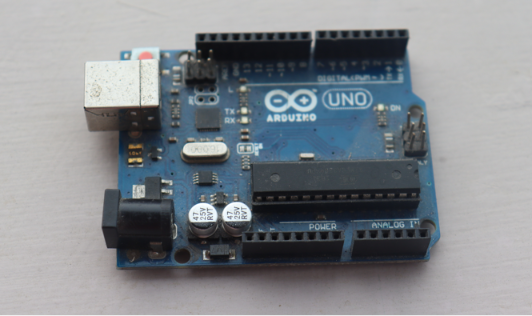
The Arduino UNO is one of the world's most popular open-source microcontroller development boards, designed to make electronics and programming accessible to everyone. Built around the ATmega328P microcontroller, it provides an easy way to create interactive projects ranging from simple LED blinkers to advanced robotics and IoT systems.
Whether you're a student, hobbyist, or engineer, the Arduino UNO offers a beginner-friendly platform with a massive online community, thousands of tutorials, and extensive library support.
Key Features
- ATmega328P microcontroller
- 14 Digital Input/Output pins (6 PWM)
- 6 Analog input pins
- 16 MHz clock speed
- USB programming support
- Operating voltage: 5V
- Large community and library support
Pin Configuration & Explanation
The Arduino UNO has a total of 20 usable I/O pins, each serving a specific purpose in a circuit. Understanding these pins is essential before starting any project.
Digital Pins (0–13)
These 14 pins can be used as either INPUT or OUTPUT, and are set in code using pinMode(). They read or send digital signals — HIGH (5V) or LOW (0V). Pins 0 (RX) and 1 (TX) are also used for serial communication with a computer, so it's best to avoid using them for other components while uploading code.
PWM Pins (~3, ~5, ~6, ~9, ~10, ~11)
Marked with a "~" symbol on the board, these 6 digital pins support Pulse Width Modulation. PWM allows you to simulate analog output using digital pins — useful for controlling LED brightness, motor speed, or servo motor angles, rather than only switching something fully on or off.
Analog Input Pins (A0–A5)
These 6 pins read analog voltage values ranging from 0 to 5V and convert them into a digital value between 0–1023 using the board's built-in 10-bit ADC (Analog-to-Digital Converter). They're commonly used with sensors like potentiometers, LDRs (light sensors), and temperature sensors that output varying voltage levels.
Power Pins (5V, 3.3V, GND, VIN)
- 5V – Supplies regulated 5V power to external components.
- 3.3V – Supplies regulated 3.3V power for components that need lower voltage.
- GND – Ground pins, required to complete any circuit. The UNO has multiple GND pins for convenience.
- VIN – Used to supply external voltage (7–12V) to power the board when not connected via USB.
RESET Pin
Connecting this pin to GND resets the microcontroller, restarting the currently uploaded program — same effect as pressing the onboard reset button.
AREF Pin
Stands for "Analog Reference." It allows you to set an external reference voltage for the analog input pins instead of the default 5V, useful for more precise analog readings in specific projects.
Crystal Oscillator (16 MHz)
Though not a pin you connect wires to, this onboard component provides the clock signal that lets the ATmega328P execute roughly 16 million instructions per second, keeping all timing-based operations (like delay() or PWM signals) accurate.
Applications
- Home automation
- Robotics
- Weather stations
- Smart irrigation
- Security systems
- IoT projects
- Educational projects
Advantages
- Easy to program
- Affordable
- Huge community support
- Compatible with numerous sensors and modules
- Perfect for beginners